Mutators:Enabling In-Game
From Game Menu
The simplest way to test a Mutator in-game is to go to Host Game in the Darkest Hour Main Menu, select your map and game settings, then add your Mutator in the Mutators Tab.
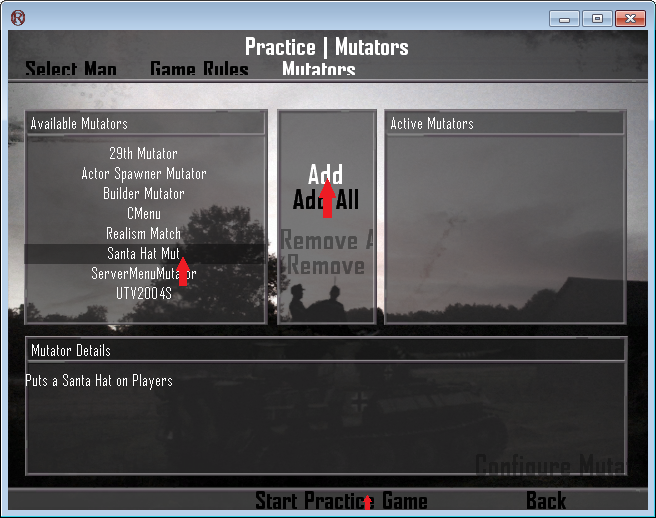
If your Mutator does not show up in the list on the left, it is likely that you did not Generate its .ucl File, so the game does not know how to display it in the list.
Listen Server
The Listen button will start a Listen server, which is the simplest way of testing a Mutator. For simple function testing, this method is recommended. In this mode, the server and the client are basically the same, so for more advanced function testing (such as things dealing with replication), this method is not recommended. Anything going on a live server should be tested in Dedicated Server mode first.
Dedicated Server
The Dedicated button will close the game and open a console window, starting a server in the background. You can then reload the game, go to the LAN Tab and connect to the dedicated server you are running. This allows you to test functionality in a true server/client setting.
From a Batch File
Following the instructions on the Setup Dedicated Server page, you can start a dedicated server with the click of a simple batch file and then load the game and join your server through the LAN Tab. To add your Mutator to the dedicated server you are starting with the batch file, simply add:
?Mutator=PackageName.ClassName
So for example if you are trying to add MyExampleMut from the MyExample package, your batch file would look something like this:
ucc server DH-Brecourt.rom?game=DH_Engine.DarkestHourGame?MaxPlayers=32?Mutator=MyExample.MyExampleMut -mod=DarkestHour -log=DH_Server.log -ini=DarkestHour.ini
To add multiple Mutators, simply separate them with commas like this:
?Mutator=MyExample.MyExampleMut,AnotherExample.AnotherExampleMut
PROTIP: If you want to be able to join your server as quickly as you can start it, check out these Custom Intro Maps which remove the startup scene and can even auto-connect you to your LAN server.